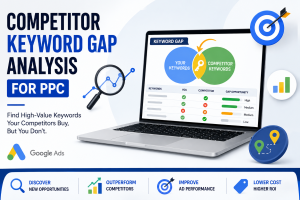
On a website, you can find specific keywords by pressing Ctrl + F if you are on Windows, and Command + F if you are using a Mac. Keyword analysis can also be done using browser inspection tools, and for a more in-depth analysis, you can use SEO tools like Ahrefs or SEMrush to inspect how keywords are placed, their density, and how well they are ranking. The foundation of SEO and other digital marketing is keywords. You can use the knowledge on how to search keywords on a web page to:
- Identify the focus of a page
- Understand how competitors are maximizing their content.
- Find out how to improve your own keyword strategy.
This capability is essential whenever a marketer, content creator, or business owner wishes to be ranked higher in Google and other search engines.
Why Searching Keywords on a Web Page Matters for SEO
You need to find keywords on a web page to learn how to make content better for search engines. You can use it to see where keywords are in titles, headings, and content, see what your competitors are doing, and improve your own on-page SEO. If you don’t do keyword research right, it will be hard to rank well on Google because you might miss chances to target the right search terms and make your content better for those terms.
The Simplest Methods of Searching for Keywords on a Web Page
1. Use Your Browser’s Find Function
Nearly all browsers possess a simple find-on-page option:
- Windows: Press Ctrl + F
- Mac: Press Command + F
- Insert the keyword that you want to check.
This emphasizes the appearances of the keyword in a second and makes it a quick and efficient method of checking frequency.
2. Inspect Page Source (SEO Method)
Focus on keyword visibility, not just frequency. Keywords in titles, headings, and the first 100 words have more SEO impact than repeated use in the body text.
To get into the use of keywords further:
- Click the right-hand side of the page and choose View Page Source or Inspect.
- Click Ctrl + F or Command + F and enter your keyword.
Select whether the keyword is found in:
- Meta Title and Meta Description
- Headings
- Alt text for images
This approach plays a very important role in the analysis of technical SEO and the way in which the page is optimized.
3. Use Free Online SEO Tools
To scan a page automatically to get its analysis, there are free tools available:
- Ubersuggest
- Ahrefs’ Free Analyzer
- SEOquake (Chrome extension)
These tools indicate the density of keywords, frequency, as well as on-page organization, which is perfect in competitor research.
4. Advanced SEO Tools for Professionals
Premium tools such as
- SEMrush
- Ahrefs
- Screaming Frog
allow you to examine a number of pages simultaneously. They work best when you have larger websites to deal with or when you need to do large-scale keyword audits.
Pro Tips for Keyword Analysis
- Consider placement, not frequency; titles and headings are more powerful than body text.
- Target the keywords that Google comprehends on a semantic level, and not precise repetitions.
- Match keywords to search purpose: is the page going to inform, sell, or give directions?
Frequently Asked Questions
Use Ctrl + F or Command + F to highlight every instance instantly.
To identify the keywords that generate traffic, use the SEMrush, Ahrefs, or Ubersuggest SEO tools.
Yes, view the page source to check keywords in meta tags, headings, and alt text.
Not as much. Focus on relevance and search intent, but proper placement in titles and headings matters.
SEOquake (Chrome extension) is popular for quick, in-browser keyword insights.
Avoid The Following Common Mistakes
- Ignoring user intent:
The correct keyword in the incorrect context will not convert. - Neglecting mobile users:
Make it readable and naturally positioned on a mobile screen. - Keyword stuffing:
Excessive keyword use is detrimental to rankings.
Read more about Pay-Per-Click Management Services here!
Mastering Keyword Search for SEO Success
Knowing how to search keywords on a web page is not just a technical skill; it teaches us about how to better create content and SEO search. You can learn about competitor strategies and develop your own, using both simple searches on the browser and sophisticated tools.
Keywords analysis is the initial step of online business expansion. In case you require professional assistance in doing your keyword research, content strategy, or complete integration of Social Media Marketing, Pervasive Marketing will take you through the entire process.